Free Delivery on Orders Above Rs 8,000
Shop Now




Original price was: Rs 7,550.Rs 5,150Current price is: Rs 5,150.
32%

Original price was: Rs 7,600.Rs 6,150Current price is: Rs 6,150.
20%
Original price was: Rs 4,500.Rs 2,300Current price is: Rs 2,300.
49%
Original price was: Rs 4,500.Rs 2,650Current price is: Rs 2,650.
42%
Original price was: Rs 3,900.Rs 3,250Current price is: Rs 3,250.
17%

Original price was: Rs 3,690.Rs 3,250Current price is: Rs 3,250.
12%
6%
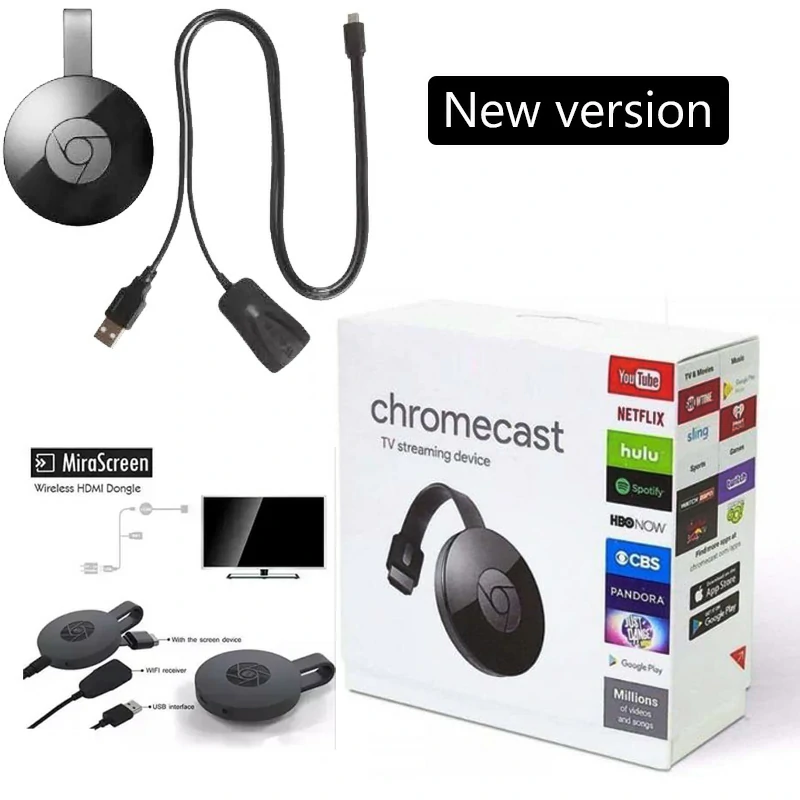
Google Chromecast HDMI Dongle Anycast Wifi Display
In Stock
-6%
3,290
List Price:
LKR 3,500
Available Payment Methods
Flexible and secure payment options

3 x Installments
3 X Rs 1,096.67

Online Payments
💵
Cash On Delivery
In Stock
In Stock
Description
Google Chromecast HDMI Dongle Anycast Wifi Display
Google Chromecast Enjoy Seamless Wireless Display with this 1080p Adapter
- Effortlessly Share Content: Wirelessly stream HD videos, games, music, photos, and files from your smartphone, tablet, PC, or Mac directly to your TV or projector.
- Transform Your TV: Upgrade your regular TV into a smart entertainment hub!
- Powerful WiFi: Built-in 2.4GHz WiFi ensures a stable connection for smooth media streaming.
- Presentations Simplified: Ideal for business meetings and e-learning sessions. Share documents, presentations, and websites wirelessly for efficient collaboration.
- Universal Compatibility: Works with Miracast, DLNA, and Airplay – cast content seamlessly from popular devices.
Use Cases
- Meetings: Project presentations and collaborate with colleagues wirelessly.
- Classrooms: Share educational content on the big screen for better engagement.
- Home Entertainment: Enjoy family time streaming photos, videos, and movies to your TV.
- Travel: Compact design – easily connect to hotel TVs and stay entertained.
How to connect?
General Setup:
Connect the Google Chromecast Adapter:
- Locate the HDMI port on your TV or projector.
- Plug the HDMI end of the wireless display adapter into this port.
- Find a USB port on your TV or projector and plug the USB end of the adapter into it. If your TV doesn’t have a USB port, you can use a standard USB wall charger.
Set Your TV Input:
- Using your TV remote, switch the input source to the HDMI port where you plugged in your adapter.
- You should see a welcome screen or instructions from the adapter on your TV.
Connect Your Device (Smartphone, Tablet, Laptop):
Android:
- Go to Settings -> Display (This may vary slightly depending on device make/model)
- Look for options like “Cast,” “Wireless Display,” or “Screen Mirroring.”
- Select your wireless display adapter from the list of available devices.
iOS:
- Open Control Center (swipe down from the top right on some models).
- Tap the “Screen Mirroring” button.
- Choose your wireless display adapter from the list.
Windows:
- Press the Windows Key + K.
- Select your wireless display adapter from the list.
Mac:
-
- Click the Airplay icon in the menu bar (looks like a rectangle with a triangle at the bottom).
- Select your wireless display adapter.
Important Notes:
- Ensure your device and the wireless display adapter are connected to the same Wi-Fi network.
- If you encounter issues, the adapter likely has a reset button – consult its manual for instructions.
- For specific troubleshooting, refer to the manual that came with your wireless display adapter, or find it on the manufacturer’s website.
Google Chromecast
Additional information
| Weight | 300 g |
|---|
10 reviews for Google Chromecast HDMI Dongle Anycast Wifi Display
Only logged in customers who have purchased this product may leave a review.
The streaming quality is fantastic. It’s affordable, easy to use, and makes streaming effortless. Highly recommended for anyone who enjoys a smooth, cable-free entertainment experience.
Amazing product!!! That’s what I was looking for – excellent quality and fast delivery.
“Dongle Anycast Wifi Display” is one of the best dongle in marketpalce in srilanka, cheap price and good quality
Thank you fast delivery
Good quality fast delivery
Cheap price and good quality
Highly recommended
Good quality! recommended
I baught chromecast and Best product! works without any errors. and good quality
Working good but the box is slightly indented